Recce v1.45.0
Column-Level Lineage Loads Fast on Large Projects
Lineage pages on large dbt projects now load and stay responsive, and column-level lineage is available almost as soon as the instance comes up. That matters because teams with thousands of models used to hit a wall on the lineage page: a 30 MB initial lineage load, a slow first paint, and every drag or click in the CLL view compounded the cost.
🧪 In open beta. Turn it on by clicking Open Beta in Recce Cloud.
Under the hood, the initial lineage load now ships only the lineage skeleton, and detailed model data and metadata are fetched on-demand when you open a model. Our cloud environment adds end-to-end compression to further reduce the data payload and serves pre-computed column-level lineage directly, so it’s ready before the instance even finishes booting.
One Share Button From OSS to Cloud
There is now one clear path from an OSS session to a Cloud shared session, and a link sent to someone outside the org lands on a Request Access page instead of a blank 403.
The Cloud Share button now lives in the OSS nav bar by default. When a recipient outside the org clicks a shared link, they see the Request Access page; the admin gets an email, approves or denies from a review page, and the recipient lands on the session. Invited new users are auto-accepted into the org during signup so they land directly on the shared session without a second click.
Deep Links That Make Agent PR Reviews Clickable
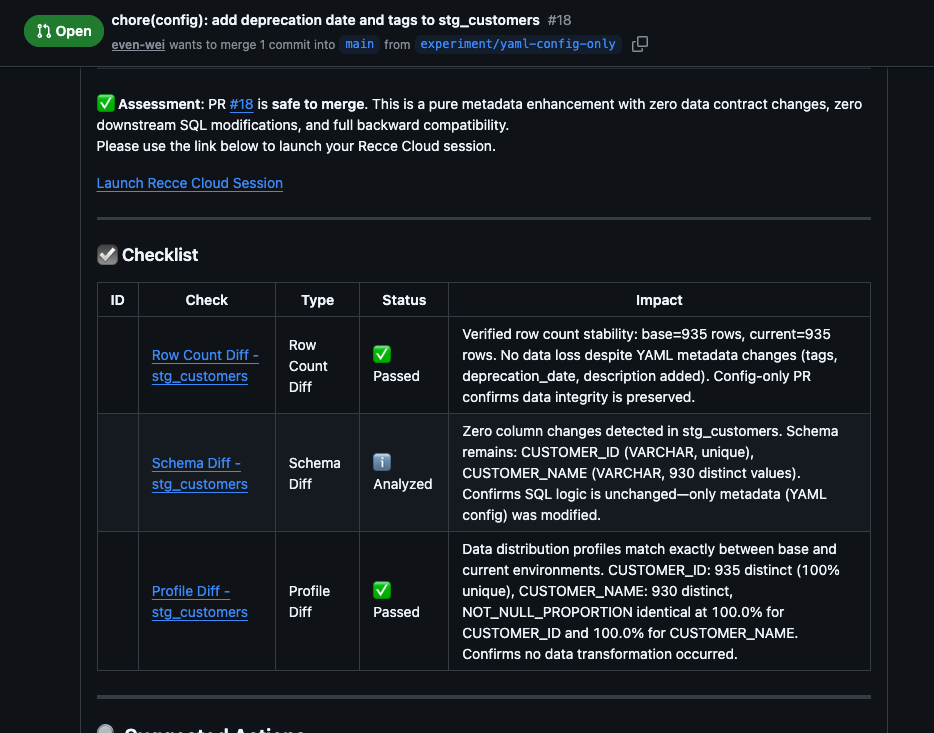
Reviewers and PR review agents now get one click from a finding in a GitHub PR comment to the exact check detail page in Recce Cloud. Before this release, the check references the review agent produced were plain text, so confirming a finding meant switching tabs, opening Recce Cloud, and hunting for the right check. One more click between reading a finding and trusting it.
v1.45.0 ships deterministic deep links. The first bold title in each bullet becomes a clickable link to the corresponding Recce Cloud check page. On the MCP side, create_check now auto-approves successful runs the same way execute_preset_checks does, keeping the checklist in sync with the actual run outcome.