Recce v1.47.0
Support MCP on Recce Cloud
You can now use Recce Cloud from any MCP-enabled chat, and hand off a Cloud session to your local AI agent in two clicks. Your AI agent can pick up a Cloud session, move to a local dbt project, then come back to Cloud, all inside the same conversation. From the Recce Cloud UI, the session row ⋯ menu and PR session row ⋯ menu both open a setup dialog with the connection command pre-filled.
Before this release, switching between Cloud and local data meant restarting the MCP server. Anything you’d built up in the chat (context, intermediate findings, the train of thought you were following) went down with it, and you had to retrace your steps to pick up where you left off. Bridging a Cloud session into your local agent was a manual stitch-together too: you copied the session ID by hand and pieced the setup together from the docs.
The Recce MCP server now boots once and stays alive, and a connected agent flips between Cloud and local with one tool call. The Cloud UI gathers the handoff into one dialog, so you go from a Cloud session to your local agent in two clicks.
Read impact at a glance in the Lineage tab
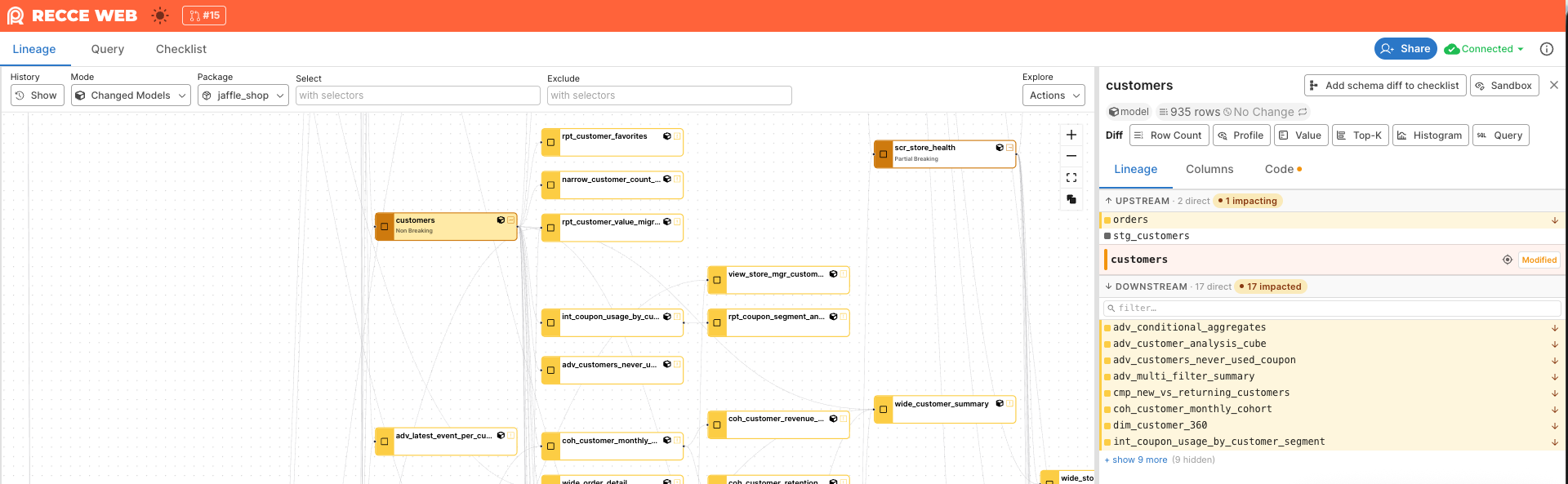
You can now read the impact chain at a glance in the Model Detail panel’s Lineage tab. Direct upstream and downstream rows show an amber rail with a directional tooltip, and a count chip in each section header filters that side to impacted rows. You see impact in one place.
Before this release, the canvas showed the impact chain as an amber border, but the Lineage tab listed every direct neighbor with no signal at all. You had to glance between the canvas and the panel to work out which upstreams or downstreams sat in the impact chain.